Website chat in Bitrix24 open channels
A question from the chat window on your site arrives in a Bitrix24 open channel through the WidgetChat connector. The agent answers from the same contact centre where they handle the other channels, and the reply appears on the site. It connects as a local portal application, without a Marketplace review.
Updated
What the agent sees
- 1 The visitor writes in the chat window on the site An ordinary question in the chat, no request form.
- 2 The message arrives in an open channel In the portal's contact centre, through the WidgetChat connector, following that channel's own queue rules.
- 3 The agent answers from Bitrix24 From the same feed where they handle the other channels.
- 4 The reply comes back into the chat window Within seconds and without a page reload.
What is carried into the portal
- Text and files Visitor messages and their attachments arrive in the open channel. The portal downloads files with a temporary link.
- A reply with a file The agent answers with a file from the portal, and the visitor gets it in the chat window.
- Edits and deletions by the visitor When the visitor edits their text, it changes in the open channel; when they delete a message, it disappears there. Edits and deletions of the agent's reply in the portal do not reach the visitor.
- A delivery mark The portal sees that the message reached the visitor.
- Closing a conversation A dialog finished in the portal is closed on our side too, and the next message starts a new session in the channel.
The portal and Telegram work together
Bitrix24 becomes a second place to answer from. The message still comes from the chat window on the site and can be answered from Telegram or from the portal. Both sides see the reply, and the visitor receives it once.
A reply written outside the portal arrives in the open channel marked as an operator reply, so the agent sees the question is already answered and does not write a second reply.
What the setup takes
- 1 Create a local application in the portal Developers, Other, Local application, API only type. Scopes: imopenlines, imconnector, im.
- 2 Move the portal domain and the application keys into the dashboard The site card, the Integrations section. The install link comes from there too; paste it into the Handler path field.
- 3 Pick the WidgetChat connector in an open channel In the settings of the contact centre channel you need. After that messages go there.
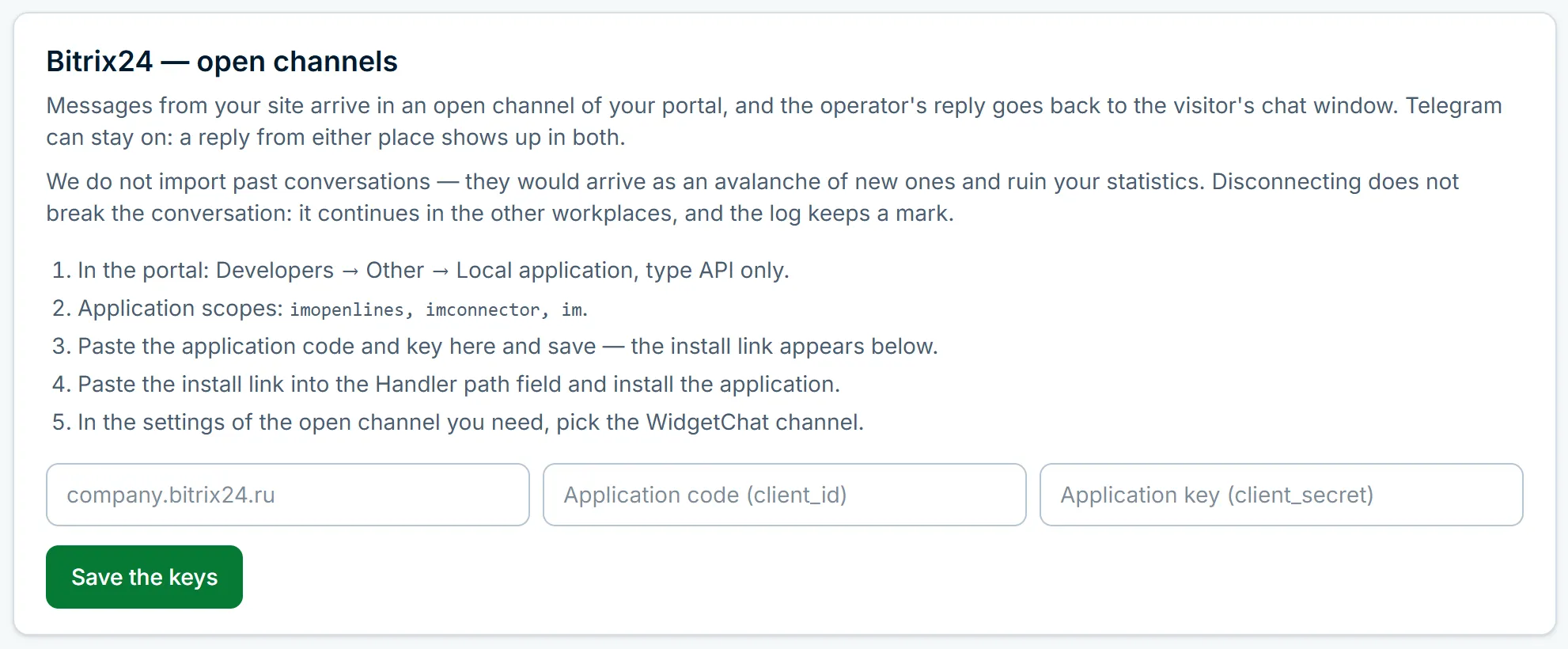
A local application works immediately: it needs no Bitrix24 Marketplace review. The keys are stored closed and never shown in dashboard responses.
What this connection does not do
Conversations from before the connection are not moved into the portal: the open channel receives new messages.
A screenshot already sent to an open channel cannot be replaced: the portal accepts edits of the text only. The visitor replaces the image on their side, the agent keeps seeing the old one, and a record of that stays in the exchange log in the dashboard.
Deals, leads and orders are not created from the chat: the connection carries the conversation, it does not sell for the agent.
This was tested on a real cloud Bitrix24 portal, which revealed five defects a mock portal did not, all fixed. If something does not line up during setup, write to us in the chat on this page and we will go through the steps with you.
Frequently asked questions
Does the app have to be published in the Bitrix24 Marketplace?
No. The connection works as a local portal application: the client creates it and no Marketplace review is needed.
Are Telegram replies visible in the open channel?
Yes. A reply written in Telegram appears in the open channel and the other way round. The visitor receives the reply once.
What if the channel is deleted in the portal?
The connection goes dark and the dashboard says the channel has to be picked again. Messages are not lost: they stay in the site's conversation.
Can several sites use one portal?
Yes, a connection belongs to one site. A neighbouring site's conversations do not land in this portal.
Read next
Add the chat to your website
Sign up with email or Telegram, set it up in the dashboard, paste one line of code. Free.